
Do you want to sell on Whatnot, or are you already a seller? Before starting…

Have you just bought an item on Whatnot and want to know where your package is? The good news is that the platform lets you track a Whatnot order directly from the app or website.
In just a few clicks, you can check your order status, access the carrier tracking number, and see how your delivery is progressing.
In this guide, I explain how to track your Whatnot order, what the different statuses mean, and what to do if your package is taking too long to arrive.
| You are looking for… | Quick access |
|---|---|
| Track your package | Activity > Purchases |
| Understand an order status | See the table below |
| Package stuck | Wait 24 to 48 hours, then contact the seller |
| Lost order | Use “Get Help” |
If you cannot immediately find your situation, do not worry. I explain each case below to help you understand what is happening with your order.
How Do You Check the Tracking of a Whatnot Order?
After every purchase, Whatnot automatically adds your order to your purchase history.
You can check its progress both from the mobile app and from the official website.
From the Whatnot App
- Open the Whatnot app.
- Tap Activity.
- Go to Purchases.
- Select the relevant order.
- Check the status of your package.
If a tracking number is available, you can also open the carrier's tracking page directly.
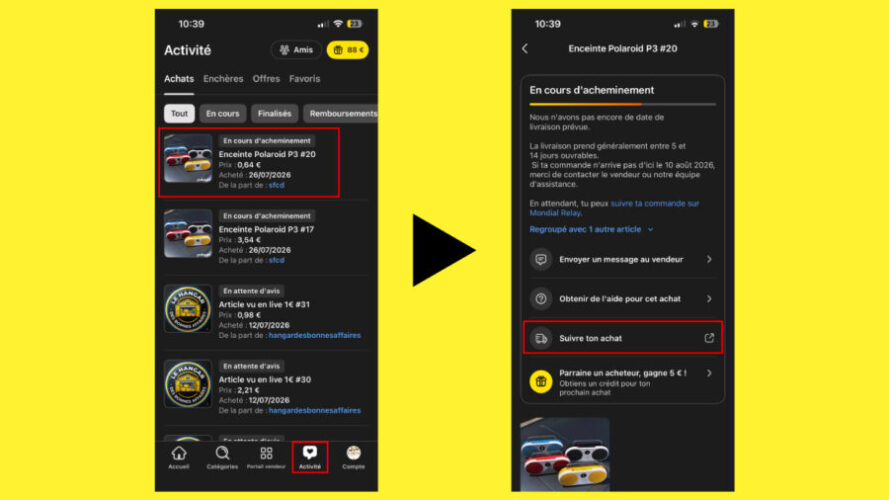
From the Whatnot Website
- Log in to your account.
- Click Activity.
- Open the Purchases section.
- Select your order.
- Check the delivery tracking information.

What Do the Different Whatnot Order Statuses Mean?
Several statuses may appear during the delivery process.
| Status | Meaning |
|---|---|
| Package being prepared | The seller is preparing your order before shipping it. |
| Label created | The seller has created the shipping label, but the carrier has not yet received the package. |
| Shipped | The carrier has received the package. |
| In transit | The package is on its way to your address. |
| Awaiting review | The order is complete and Whatnot is asking you to leave a review. |
Why Is My Whatnot Tracking Not Working?
It is common for tracking information not to appear immediately.
In most cases, this is completely normal.
The most common reasons include:
- The seller has only just created the shipping label.
- The carrier has not scanned the package yet.
- Tracking information may take 24 to 48 hours to appear.
- The carrier may not provide detailed tracking.
I therefore recommend waiting at least two days before worrying.
My Package Is Stuck on “Label Created”
This is probably the status that worries buyers the most.
In reality, it simply means that the seller has prepared the shipment, but the carrier has not yet registered the package.
If this status remains unchanged for several business days, you can contact the seller directly through Whatnot to check whether the package has actually been dropped off.
What Should You Do If Your Whatnot Tracking Stops Updating?
If your tracking remains stuck for several days, first check whether the carrier has received the package. In most cases, waiting 24 to 48 hours is normal. After that, contact the seller and then Whatnot Support if necessary.
My advice:
If your tracking is stuck on “Label Created”, do not immediately open a dispute. Wait at least 48 business hours, as many carriers can take time to complete their first scan.
How Can You Track the Package Directly With the Carrier?
When a tracking number is available, Whatnot displays a button that lets you open the carrier's website.
You can then check:
- the shipping date;
- the different sorting facilities;
- the estimated delivery date;
- the delivery confirmation.
Carrier tracking is generally more detailed than the information shown on Whatnot.
For more information about shipping times and costs, you can also read my guide about Whatnot shipping.
What Should You Do If Your Whatnot Order Is Late?
If your package seems to have been stuck for several days, you have several options.
- Check the tracking number.
- Wait 24 to 48 hours after the shipping label was created.
- Contact the seller through Whatnot messaging.
- Use the Get Help button from your order.
Every purchase is covered by Whatnot Buyer Protection, which allows you to get assistance if there is a delivery problem or if your item never arrives.
If your package arrives but the product does not match the description, you can also read my guide about items not as described on Whatnot.
You can also read my dedicated guide: How to Open a Dispute on Whatnot.
My Advice Before Contacting Support
After placing dozens of orders on Whatnot, I have noticed that tracking updates can sometimes take several hours, or even one or two days, to appear. In most cases, this does not mean that your package is lost.
I therefore recommend:
- waiting at least 48 hours after the shipping label is created;
- checking the tracking directly on the carrier's website;
- keeping an eye on Whatnot notifications;
- contacting the seller before opening a dispute.
In most cases, the package is eventually processed without any action being necessary.
If the problem continues after these checks, you can also read my guide explaining how to contact Whatnot Support.
FAQ: Tracking a Whatnot Order
Where Can I See My Whatnot Orders?
From the app or website, open Activity, then Purchases to find all your orders.
Why Has My Whatnot Tracking Stopped Updating?
The carrier may take up to 48 hours to scan the package. If the tracking remains stuck for several days, contact the seller.
How Can I Find Out Which Carrier Is Being Used?
Your order details show the carrier and tracking number when this information is available.
What Should I Do If I Never Receive My Order?
Use the Get Help option in your order to receive assistance through Whatnot Buyer Protection.
How Long Does a Whatnot Order Take to Arrive?
Delivery time depends on the seller, carrier, and shipping country. You can track its progress directly from your purchase history.
Can You Track a Whatnot Order Without an Account?
No. You need to be logged in to your Whatnot account to view your purchase details. However, once you have the tracking number, you can track the package directly on the carrier's website.
Can I Track a Whatnot Order From My Computer?
Yes. Tracking is available both from the mobile app and the official Whatnot website after logging in to your account.
In Summary
Tracking a Whatnot order is very simple. From your purchase history, you can check the status of your package, access carrier tracking, and request help if there is a problem.
Personally, I find Whatnot's tracking system clear and sufficient in most cases. If your order is taking longer than expected, do not worry too quickly. A delay of a few hours or even a few days between tracking updates can be completely normal.

Related Posts


[…] How to track a Whatnot order […]