
Do you want to sell on Whatnot, or are you already a seller? Before starting…

Have you purchased an item on Whatnot and are looking for your invoice, purchase receipt, or Video Receipt? Don't worry—these documents are usually available directly from your account, as long as you know where to look.
In this guide, I'll show you how to find your order details, access your receipt, watch the exact moment you won an auction using the Video Receipt feature, and what to do if a document is missing.
If you're simply looking for your order information (status, tracking, seller details, etc.), I also recommend reading my guide on How to View Your Whatnot Order Details.
Invoice, Receipt, and Video Receipt: What's the Difference?
Many users search for a Whatnot invoice, even though the platform more commonly refers to a receipt.
These three documents don't serve the same purpose.
| Document | Purpose |
|---|---|
| Receipt | Confirms your purchase and summarizes your order details. |
| Invoice | A document that may be required for business accounting. Its availability depends largely on the seller. |
| Video Receipt | Lets you replay the exact moment you purchased or won an item during a live stream. |
For most personal purchases, the standard Whatnot receipt is all you'll ever need.
How to Find Your Whatnot Purchase Receipt
Finding your receipt only takes a few seconds.
1. Sign In to Your Whatnot Account
Open the Whatnot app and sign in using the account you used to make your purchase.
2. Open the “Activity” Tab
From the bottom navigation menu, tap Activity.
You'll then see the history of all your orders.

3. Select the “Purchases” Section
At the top of the screen, you'll find several categories:
- Ongoing
- Completed
- Refunds
- Cancellations
- Waiting for Review
Choose the category that contains your order, then open the relevant purchase.
4. View Your Order Details
Once you've opened the order, you'll find all the important information, including:
- the order number;
- the purchase date;
- the estimated or completed delivery date;
- the order status;
- the seller's information;
- tracking details;
- access to your purchase receipt.
5. Open the Order Receipt
Scroll down to the Order Receipt section.
There you'll usually find:
- the subtotal;
- shipping costs;
- applicable taxes;
- the total amount paid;
- your shipping address or selected pickup location.
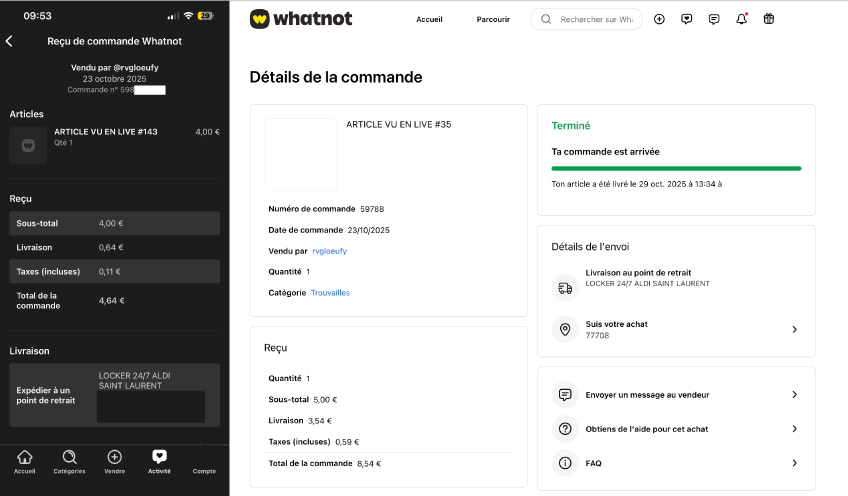 Whatnot order receipt[/caption>
If you'd like a more detailed explanation, I also recommend my guide: How to View Your Whatnot Order Details.
How to Download Your Whatnot Receipt
Once you've opened your order, Whatnot generally allows you to access the corresponding receipt.
Depending on your device and app version, you may be able to:
- view the receipt;
- share it;
- or download it when that option is available.
The available information may vary slightly depending on your country and the current version of the platform.
Typically, your receipt includes:
- the purchase date;
- the seller's name;
- the item price;
- shipping costs;
- applicable taxes;
- the total amount paid.
Can You Get a Whatnot Invoice?
This is probably the question I receive most often.
For personal purchases, the receipt available in your order is usually sufficient as proof of purchase.
However, if you need an official invoice for business accounting, the situation is slightly different.
Whatnot is an online marketplace that connects buyers and sellers.
Depending on the seller and their business status, the invoice may be issued directly by the seller rather than by Whatnot.
If you're buying for business purposes, I recommend contacting the seller directly to ask whether they can provide a valid invoice.
If you need help, you can also read my guide: How to Contact Whatnot.
How to Watch Your Whatnot Video Receipt
Many users don't even know this feature exists.
When you purchase an item during a live stream, Whatnot records the exact moment you win or buy it.
You can replay that moment using the Video Receipt.
Personally, I find this feature incredibly useful.
It lets you verify exactly how the seller presented the item, the condition that was described, and the price you paid during the auction.
How to Find Your Whatnot Video Receipt
The Whatnot Video Receipt is only available for purchases made during a live stream.
To access it, simply:
- open your order history;
- select the relevant order;
- open the order details;
- tap Video Receipt if it's available.
Whatnot will immediately play the recording from the exact moment you purchased or won the item.
There's no need to search through the entire replay yourself.
What Is the Video Receipt Used For?
At first, I thought this feature was just a nice extra.
In reality, it's incredibly useful.
The Video Receipt allows you to:
- review the condition of the item as described by the seller;
- verify which accessories were shown during the live stream;
- confirm the final auction price;
- see the exact moment you completed your purchase;
- keep additional evidence in case of a dispute.
It's actually one of my favorite Whatnot features.
Very few online marketplaces provide a built-in video record of your purchase.
Why Can't I Find My Video Receipt?
Some buyers can't find this feature.
There are several possible reasons.
You Didn't Buy During a Live Stream
Video Receipts are mainly available for purchases made during live auctions or live sales.
If you purchased an item using Buy It Now from a seller's storefront, this feature may not be available.
If you're new to Buy It Now, I also recommend reading my guide: How to Buy an Item with Buy It Now on Whatnot.
The Replay Isn't Available Yet
After some live streams, it may take a few minutes before the replay has been fully processed.
Once processing is complete, the Video Receipt usually becomes available.
The Live Replay Is No Longer Available
In some situations, a replay may no longer be accessible.
Even then, you'll still be able to view your standard receipt and your order details.
Can the Video Receipt Help Resolve a Problem?
Yes—and that's one of its biggest advantages.
If you receive an item that doesn't match what was shown during the live stream, or if you're unsure about something the seller said, the Video Receipt lets you replay the exact moment of the sale.
However, keep one important point in mind.
The Video Receipt doesn't replace Whatnot's official dispute process.
It's simply additional evidence that may help when communicating with the seller or Whatnot Support.
What Should You Do If You Can't Find Your Receipt or Invoice?
Before contacting Whatnot, I recommend checking a few things first:
- make sure you're signed in to the correct account;
- confirm that the order has been completed;
- verify that your payment was successfully processed;
- ensure you're looking at the correct order;
- update your Whatnot app to the latest version.
In most cases, the issue is simply caused by using the wrong account or by an order that's still being processed.
How to Request an Invoice from the Seller
If you're purchasing items for your business, the standard Whatnot receipt may not be sufficient.
The easiest solution is to contact the seller directly.
Ask whether they can provide an invoice that includes the information you need for your accounting records.
Not every seller offers invoices.
It depends on their business status and how they operate.
If you're unsure how to contact a seller or Whatnot Support, you can also read my guide: How to Contact Whatnot.
Common Mistakes to Avoid
- Confusing a purchase receipt with a business invoice.
- Deleting an order before checking its details.
- Waiting several weeks before reporting a problem.
- Forgetting to check the Video Receipt when it's available.
- Contacting Whatnot Support immediately when the seller may be able to resolve the issue more quickly.
A few minutes of verification can often solve the problem without any additional steps.
My Opinion
In my opinion, Whatnot provides an excellent system for accessing purchase information.
Between the order details, the standard receipt, and the Video Receipt, it's usually easy to verify exactly what you bought and under what conditions.
The Video Receipt is my favorite feature.
It's something you rarely see on online marketplaces, and it adds genuine transparency—especially during live auctions.
If you're buying for business purposes, however, I recommend confirming from the start whether the seller can issue an official invoice.
Doing so can save you accounting headaches later.
Summary
- You can find your Whatnot receipt directly in your order details.
- Your receipt includes the purchase amount, shipping costs, and order information.
- The Video Receipt lets you replay the exact moment you purchased or won an item during a live stream.
- An official business invoice is not automatically provided by Whatnot.
- If you need one, contact the seller directly.
- If you encounter an issue, always check your order details before contacting support.
FAQ
Where can I find my Whatnot invoice?
For most purchases, Whatnot provides a receipt that you can access from your order details.
If you need a formal business invoice, you'll usually need to request it directly from the seller.
How do I download my Whatnot receipt?
Open your order history, select the relevant purchase, and access the receipt.
Depending on your device and app version, you may be able to download or share it.
How do I watch my Whatnot Video Receipt?
Open the details of a purchase made during a live stream, then tap Video Receipt if it's available.
Playback starts at the exact moment you bought or won the item.
Why can't I find my Video Receipt?
Video Receipts are mainly available for purchases made during live streams.
They may also be temporarily unavailable while the replay is still processing or if the replay is no longer accessible.
Is a Whatnot receipt valid as proof of purchase?
Yes.
For personal purchases, the receipt is generally sufficient as proof of purchase.
If you need an official invoice for business purposes, you'll need to check whether the seller can provide one.
What should I do if I can't find my receipt?
First, verify that you're signed in to the correct account and that your order has been completed.
If you still can't locate it, contact the seller first, then reach out to Whatnot Support if necessary.
Sources

Related Posts


Comments (0)